Recently, I was looking for a soldering station for electronics prototyping and repairs, with both SMD and THT components. Working with a lot of different components packages involves the need for quickly changing between different solder tips. To achieve fast heating time, stable temperatures and good heat transfer even from small tips, active tip technology is needed. This means that heater element and temperature sensor is enclosed in the tip cartridges. All major brands offer active tip soldering stations now, and there are a lot of alternatives to choose from. The specs of the JBC CDB seemed really promising, and I ordered one of these from eleshop.eu, along with 5 cartridges (C245-158E, C245-773, C245-944, C245-155E and C245-911); all chisel shaped, and with widths between 0.8 and 3.2mm. Price for station and tips: €538.42 + €26.46 Shipping. On top of that comes 25% VAT (import to Norway) and a handling fee from UPS. I have yet to receive the bill from UPS, but the total price is expected to be around €690, and for this amount one shall expect top quality.
The CDB comes in versions CD-1BQF, CD-2BQF and CD-9BQF which are made mains voltages 120V, 230V and 100V respectively, but which are otherwise identical.


The specs look really promising, but is the JBC CD really that good? The short answer is no. It’s not even close. I’ll come back to that in detail. During testing, there were several issues that the manufacturer needed to look into, and this led to a chain of email exchange between me, JBC and Eleshop. The answers from JBC were interesting. To make the subjects easy to follow for the readers, I’ve divided this blog post into one paragraph per issue, each with description, pictures and related mail communication.
First impressions.
During unboxing and startup, I noted that the unit is fairly heavy, which is good, and appears to be robust, though being built in a plastic enclosure. It is easy to get started, and the display menus are relatively intuitive. I did, however, notice two things that made me question JBCs routines for inspection and testing before the units are shipped out to the customers.

On the inside of the display glass, there is a foggy white area. Probably, a drop of liquid was spilled during assembly. This doesn’t affect display readability, but it definitely should have been discovered during inspection.

Mail dialog:
 Me
Me
08/23/2024
The first are minor details, but still worth mentioning. When opening the box, the first thing I notice is a white dot on the inside of the display glass. Please see attachment 01.jpg. This does not impact display readability, but it is both annoying and unnecessary. Also, it looks like the person who assembled the case was unable to get the bottom cover to fit perfectly, but apparently thought “close enough” (02.jpg). Especially the dot inside the display glass should have been discovered if a quick visual inspection had been performed before packaging.
JBC
08/30/2024
If the screen is damaged and not well assembled you can send back the unit to get a replacement.
Me
09/01/2024
The LCD screen is not likely to damaged; but there is a small area of white coating inside the display glass, which should have been discovered during inspection. Wouldn’t it be better to use a couple of minutes extra per unit, to detect and fix small discrepancies like these, instead of asking the customers to return the product later?
JBC
09/03/2024
We understand your point of view, and we will put more emphasis on it for the future
Heating time
The first thing I notice is that the actual heating time is several times higher than JBC’s claimed 2 seconds from 20 to 350°C. As expected, actual heating time varies with tip size. Here’s a test with tip type C245-155E. Measuring 2.4 x 0.8mm it’s not particularly big. The temperature overshoots to 365°C, and it takes 8 seconds before it stabilizes at 350°C; four times higher than spec.
This is of course an issue that JBC needs to solve/explain. Here’s the mail dialog regarding this:
Me
08/23/2024
Heat-up time: https://www.youtube.com/shorts/chNCBzht1r8
This video shows heating from 25 to 350°C for a C245-155E, which is a medium sized tip. As we can see, it takes about 4.5 seconds to pass 350°C on the way up. Then, there is an overshoot to 365°C, and the total time before the tool stabilizes at 350°C is more than 8 seconds. Some degree of overshoot is to be expected for a fast soldering station, but please be honest about it. The actual heat-up time in this case is 4 times than what the manufacturer promises.
JBC
08/30/2024
Our heating time is indeed two seconds for but this is for the C210 cartridge range connected to the CD, please see this video.
Me
09/01/2024
You say that the heating time is 2 seconds, but only for the C210 cartridge range. The CDB station, however, is sold with the T245 handle, which is for C245 cartridges (product page screenshot: 07.jpg). How can you then assert that the heating time from 20 to 350°C for this product is 2 seconds? The product page is linked to a page showing a perfect heating curve, with no overshoot, and 2 secs heating time (08.jpg). This page also contains the statement “JBC Tips reach 350°C (662°F) in only 2 seconds”, but nowhere does it mention that this applies only to specific cartridges from one of the cartridge ranges. This is deceptive marketing. Equivalent info is found on the Eleshop web shop (09.jpg).
Your video shows a tiny cartridge from the C210 range, and the temperature is set to 325°, not 350°. Also, strangely, the temperature increases from 20 to 40 degrees while the unit is still in hibernation mode.
JBC
09/03/2024
In the displayed video the handle in use is the C210, so this is completely correct
Summarized, 2 seconds heating time will never be achieved with the T245 handle, which the CDB station is shipped with. The video from JBC shows a T210 handle and a tiny C210 cartridge, which heats up faster, but which is not part of the CDB package.
Overshoot
This is the claimed heating curve for JBC tips. Straight up to 350°C in two seconds, with absolutely no overshoot.

Testing has already revealed that this is far from the truth. Next cartridge I tested was the C245-773, which with its 0.8 x 0.3 mm tip is expected to heat up faster than the previous.
The test revealed something interesting and worrying:
When set temperature is 350°C, the actual temperature overshoots to as high as 385°C before gradually approaching 350°C. A YouTube viewer posted the comment: “this is fake station”. Sadly, he was wrong; this a genuine JBC. However, with such poor performance, one might as well buy a cheap replica.

Based on temperature readings vs. time, I’ve drawn the de facto curve for JBC CDB with C245-773. In reality the performance of the JBC is actually worse than their made-up example for “other brands”.
It took 11 seconds for the temperature to stabilize at 350°C. The horrible overshoot is believed to significantly reduce cartridge lifetime.
Mail dialog regarding this problem:
Me
08/23/2024
Overshoot: https://youtube.com/shorts/L_ulFPdIsNo
One can expect different tips to have different heating time. With the same power, a smaller mass is expected to heat up faster. This time I’m trying a C245-773 tip, which is fairly small. As we can see, the temperature actually overshoots to 385°C before gradually approaching the set temperature of 350°C. A such significant overshoot is not to be expected from a soldering station in this price range, and certainly not when the manufacturer promises no overshoot at all. With this tip, it takes 3 seconds before the temperature passes 350°C on its way up, and 11 seconds until the temperature stabilizes at 350°C.
JBC
08/30/2024
There are plenty of tips with different shapes, depending on the tip there will be some overshoot in other cases there are no overshoot, you can see that also in this video. We noticed though that there are some values in the temperature control that can be improved, and we will consider it for the next updates.
Me
09/01/2024
To demonstrate best case scenario when it comes to overshoot, you’ve selected a chunky tip from what also appears to be the C210 range. The set temperature is 325°. A small overshoot to 330° is detected, which is perfectly fine. The interesting thing here is takes 8 seconds before the tip stabilizes at set temperature, not 2. Let’s have a look at my overshoot demonstration video https://www.youtube.com/shorts/L_ulFPdIsNo once more. This shows an example of the actual overshoot when using one of the smaller tips of the C245 range, and it actually overshoots to 385°, which is way beyond what should be expected from a soldering station in this price range. Based on display data for every second, I’ve drawn a curve of the actual performance (10.jpg). How do you think the real-life example compares with what you promise on your website? You are fully aware that few (if any) of the tips match the curve you’ve drawn. Still, you take no reservations when proudly presenting the ideal curve. I do believe the CDB station has been on the market for several years now, yet it behaves like the firmware is still in beta, and you consider trying to improve it in future updates.
JBC
09/03/2024
We appreciate your feedback, and it has been passed along to corresponding department
Thermal deviation
During test and basic usage, I noticed something interesting. When the solder tip is touching colder surfaces like copper areas on a PCB, or when using the tip cleaner sponge, one would expect a temporary temperature drop. The display of the JBC station, however, stays unchanged at set temperature, in this case 350°C, regardless of thermal drain. This degree of stability would be remarkable if it was true, but is it true? You already guessed it: it is far from true.
During this test I’m using cartridge C245-944. A thermocouple is attached to the tip. There is some thermal resistance between the solder tip and the thermocouple, so don’t mind the initial 20° temperature difference between what’s displayed on the soldering station vs. what’s measured by the multimeter. The interesting thing is that the soldering station pretends to stay stable at the set temperature of 350°C, while a wet sponge cools down the tip by more than 40°C. Note that the sponge never touches the thermocouple; only the tip. Apparently the soldering station is programmed to lie about it’s own temperature to appear more stable than it actually is.
Mail dialog regarding this issue:
Me
08/23/2024
Thermal deviation: https://youtu.be/2wyBVYIRp2Q
The tip used for this test is C245-944. Due to the station’s display, the temperature stays rock solid at 350°C, even when the tip is cooled down with a wet sponge. This would have been quite impressive if it was true. A thermocouple attached to the tip, however, tells a different story. There is of course some thermal resistance between the tip and the thermocouple, so when the multimeter shows about 20°C lower temperature, this is to be expected. It’s the variations during heat drain that is the interesting part here. When touching the tip with a sponge, the measured temperature drops about 40°C, while the JBC’s display presents no deviation at all. Note that the sponge never touches the thermocouple; only the solder tip. Some temperature loss is to be expected under such conditions, but the soldering station should be honest about it; not pretend that its more temperature stable than it actually is.
JBC
08/30/2024
We are measuring the tip temperature with an internal thermocouple, whenever a slight drop in temperature is noticed the station will counter it by increasing the internal temperature and a calculation is done to estimate the surface temperature in the tip, this works best at idle and is also very good when soldering, nevertheless your scenario differs quite a lot from an expected behavior, which means that the calculations won’t be as accurate as in a regular user case. Also there is some sort of a filter in the temperature displayed in order to be more easy to read by the user.
Me
09/01/2024
This video shows a >40° temperature drop when tip is cooled down with a wet sponge: https://www.youtube.com/watch?v=2wyBVYIRp2Q. Clearly, the soldering station notices the thermal drain, and tries to compensate by increasing the output power. Still, it presents no temperature changes in the display. There is a saying ‘fake it till you make it’, and the firmware appears to be faking it. Is this what you refer to as ‘some sort of a filter in the temperature displayed in order to be more easy to read by the user’? Temperature changes are to be expected under such conditions, but please be honest about it.
JBC
09/03/2024
We take note of your comments
Firmware update
The unit was shipped with firmware version 8886739. I was hoping that a firmware update would improve the performance. Confusingly, the firmware version presented on JBCs web page presented a lower version number than what’s already installed.
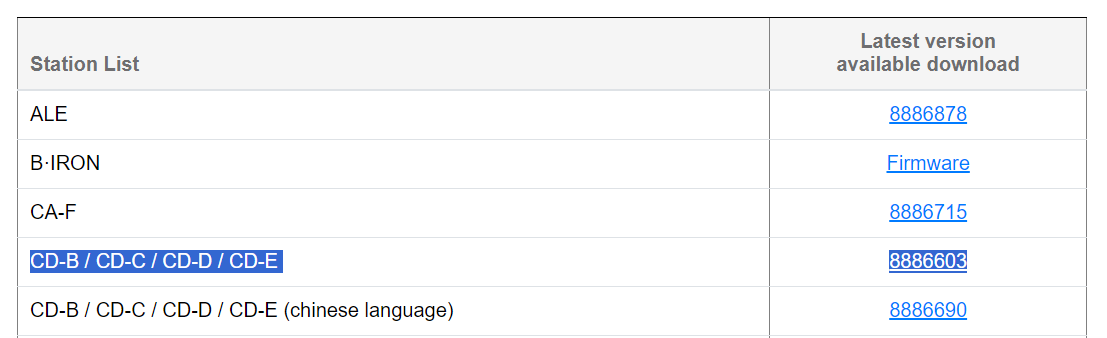
The update process was fairly easy: download and install the proprietary update software, connect the soldering station via USB, and the program should automatically detect the connecting unit and select firmware version correspondingly.

Sadly, updating to firmware version 8886896 did not solve any of the issues described above. Instead, a new problem was introduced, and this is described below. Since firmware version is automatically selected by the software, and not selectable by the user, I’m unable to revert to the previous version.
Error messages after cartridge change
After firmware update, the soldering station strangely presents an error message related to the earthing fuse, after almost every cartridge change:
I don’t know what causes this, but the earthing fuse is perfectly fine, and so is the earth connection from the mains outlet. Mail dialog with JBC:
Me
08/23/2024
Error message after tip change: https://youtube.com/shorts/vnplgtXauJQ
The soldering station was delivered with firmware version 8886739. I performed an upgrade to 8886896, hoping that this would address some of the temperature issues. Sadly, it did not. After the firmware update, the soldering station presents an error message related to the earthing fuse after almost every tip change. The fuse is perfectly fine (04.jpg) and so is the ground connection from the mains outlet. The firmware update application doesn’t let the user choose which version to install, hence I’m unable to revert to the previous firmware version.
JBC
08/30/2024
It is a weird behavior and shouldn’t really happen, if you send back the unit write down the issues so that we can take a look at it later on
Me
09/01/2024
The problem occurred after firmware update to version 8886896. This may be incidental, but have you tried to replicate the error in your lab, with the same station, firmware and tool handle?
JBC
09/03/2024
I have personally tried but could not reproduce the issue, so I suggest you to replace it
Cartridge holder and swapping
The station has an integrated holder for 4 cartridges, and a tool for cartridge extraction. On JBCs website, this is described as lo less than an “exclusive fast and safe Cartridge Exchanger.” How well does it work in practice?
Before you can insert the cartridge, you must take it out of the holder, flip it 180 degrees, and insert it into the cartridge extractor. Moving the previously used cartridge to the holder involves turning it 180°; a great opportunity to burn your fingertips.
The station is fairly heavy, but not heavy enough to stand still when you’re extracting a cartridge. You have to hold the station with your other hand, and maybe leave a fingerprint on the display glass, like I just did.
There is a tip holder which may improve cartridge storage and swapping, if it’s heavy enough, but judging by the price, it must be made of unobtanium.

Practical use + comparison to another soldering station
For the following tests, I’d like to have a similarly priced soldering station from on of the major brands, to use as reference. Sadly, I don’t. I do, however, have a half finished prototype for a DIY 8-port soldering station, using cartridges from the Weller RT series. This project has been on hold for at least a year, and I realized that I didn’t have enough time to finish it. The heating and temperature algorithms are far from finished, and a lot of fine tuning has yet to be done. Still, it would be interesting to see how it compares to the JBC. One would expect the JBC to be superior in all tests, but actually it is not.
First, let’s look at heating time and overshoot. Here, I’m using a Weller RT9 tip, which is chisel shaped with dimensions 0.8×0.4 mm; quite similar to JBC C245-773 which is allegedly chisel shaped with size 0.8×0.3mm. In my DIY prototype, I’ve limited the heater power to 40W, while JBC claims the CDB has an output power of 130W.
When set heating up to 350°C, the tip temperature briefly overshoots to 368°C, which I’m not fully satisfied with, but this is still far better than the JBC C245-773, which did overshoot to 385°C. The time before the DIY solution stabilizes at set temperature is 10 seconds, while the JBC needs 11 seconds for the same task.
Heat transfer
The ability to transfer sufficient heat from small tips is often crucial when soldering small SMD components. This is specially noticeable when soldering small packages to large copper areas.

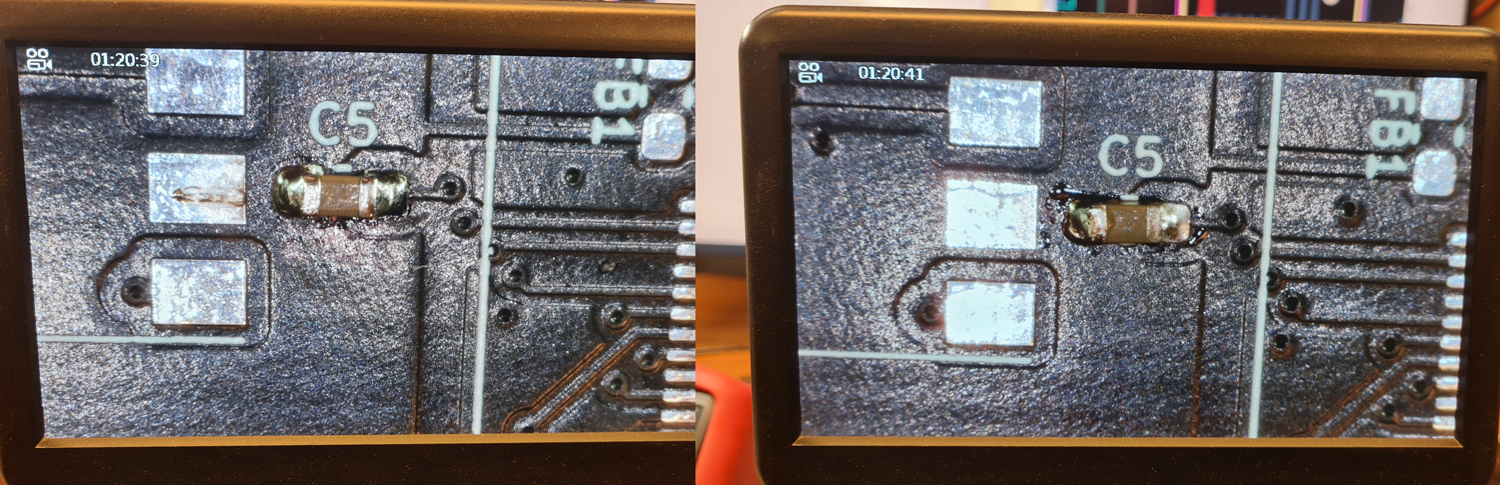
The two stations, still using 0.8mm chisel tips, are given the task of soldering a capacitor with 0603 package, where one end connects to a large copper pour (for cooling a nearby LDO regulator). Both were of course set at the same temperature (350°C), and using same solder (Stannol, lead-free).
This was a struggle for both of them, but when given some extra time to heat up the copper area, and some additional flux, they both managed to do it. Looking at the solderings under a microscope, the DIY station has provided a better result than the JBC, which is also surprising, given that JBC has a much higher power rating, and that they’ve got a team of engineers which probably has spent a lot of time trying to optimize the algorithms for power and temperature control, while I haven’t even started to write algorithms to counteract heat drop in my DIY solution. The picture below shows the results of DIY tool to the left, JBC to the right.
Actual work with the JBC and the DIY soldering station.
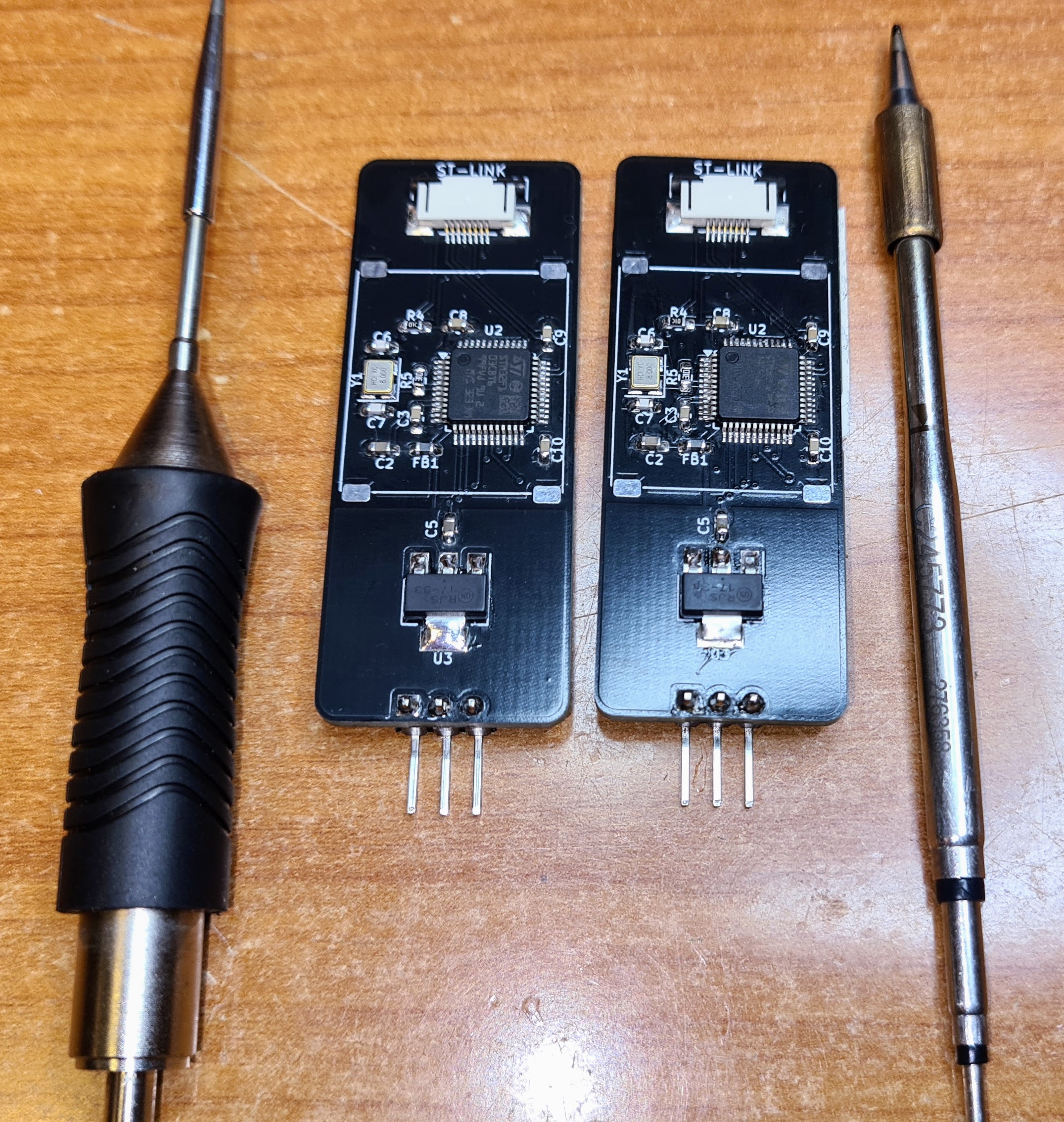
In this test, I soldered two MCU boards for Digital 6U5 Magic Eye Tubes; one using the JBC and another using my half-finished prototype. Each board contains a couple of FFC connectors with 0.5mm pitch, a microcontroller in LQFP-48 package (also with 0.5mm pitch), plus several 0603 package passives, a SOT-223 voltage regulator + more, i.e. good real-life examples of both precision and allround soldering. Both stations were set at 335°C, and using same lead-free solder.
The handpiece is important. At first, the JBC T245 feels more ergonomic than my temporary DIY handpiece, which is basically an aluminium tube with some electronics inside.
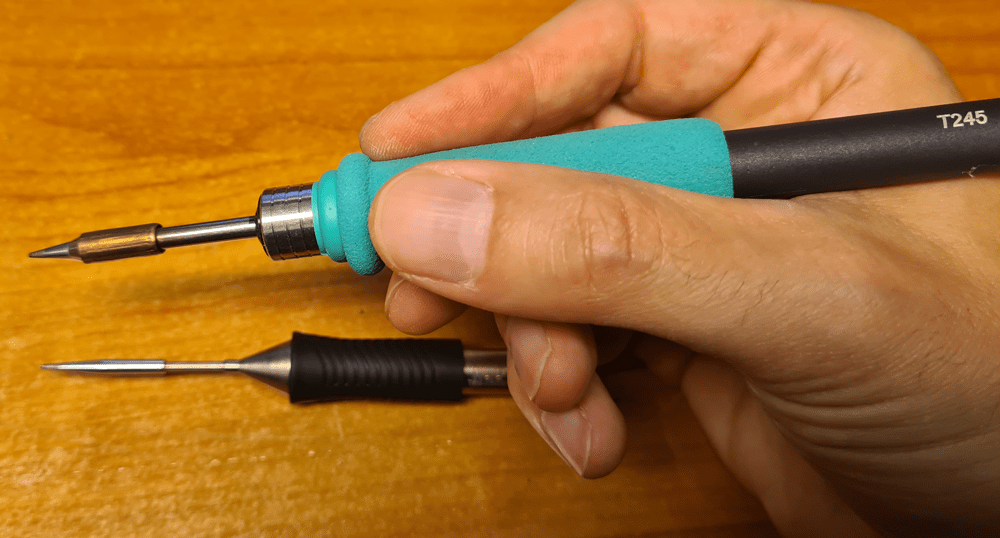

For precision soldering, like the 0.5mm pitch connectors and microcontrollers, the DIY solution with Weller RT tips is actually easier to hold steady. Even with reasonably steady hands and good fine motor skills, I was struggling to achieve decent results with the JBC T245, which felt bulky. With the Weller RT tip, the precision soldering was easier. The end results are comparable; DIY with Weller RT to the left, JBC to the right.
JBC tip shape
All the five JBC tips I ordered are allegedly chisel shaped. One of them, the C245-773, with a nominal size of 0.8×0.3mm did, however, looked conical at first glance, and definitely of the same shape as on the drawing o the package.

I actually had to look at it under a microscope to see that it is slightly flattened on two sides.
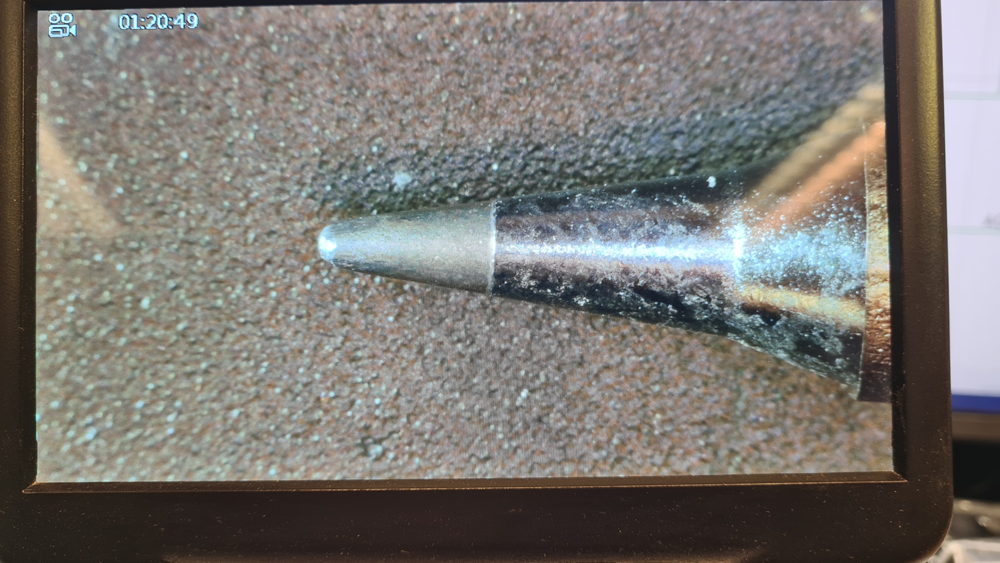
The pictures were taken after cleaning the tip, so there is no residual solder present.
This is something that JBC needed to look into, and here’s the mail dialog:
Me
08/23/2024
Eleshop
08/23/2024
As for the tip inquiry, usually tips are delivered with tin to protect the tip form oxidation.
If you use the tip and the tin melts, probably you will see a chiselled tip unless there’s a production problem with that tip.
Me
08/23/2024
The pictures of the solder tip were taken after testing and cleaning.
Eleshop
08/23/2024
About the tip, JBC will also probably offer a replacement for that but we will see.
JBC
08/30/2024
If you feel the dimensions are out of order, please also send back the faulty ones and we will analyze them. I guess you did clean them to see the shape with no tin on the tip.
Me
09/01/2024
As you may see from earlier mail dialog with Eleshop, the pictures of the tip are taken after testing and cleaning. The actual shape of the tip doesn’t resemble the drawing.
JBC
09/03/2024
Please send in the cartridge we will measure the dimensions and come back to you
I suspect that JBC skips inspection and quality control, and leaves this job for the customers, which then have to return faulty items. Tip comparison: JBC C245-773 (chisel 0.8×0.3mm) to the left. Weller RT9 (chisel 0.8×0.4mm) to the right. The Weller seems to match product description and manufacturer drawings. The JBC clearly does not.

Output power
The JBC CD-2BQF allegedly has an output power of 130W. During testing with different sized cartridges, I found that hard to believe. The heating time is in the same area as the Weller RT tips powered with 40W from my DIY soldering station, and there is a significant temperature drop when the tips are held against a colder surface.
On the rear side of the JBC unit, there is a label which shows that input power is 120W; less than the output power. This would be sensational if it was true. I asked JBC what the real output power is. They didn’t really answer my question.
Me
09/01/2024
The CD-2BQF is marketed as a 130W soldering station. A label on the back of the unit shows that input power is 120W, so apparently JBC invented perpetuum mobile 😉
What’s the real output power of this unit, i.e. what can it deliver continuously?
JBC
09/03/2024
The 120 W refer to the input nominal power (average consumption during its usage), the 130W refer to the maximum power delivered to the tool
The peak power a soldering station can deliver for a few milliseconds is not very interesting. What matters it what it can deliver continuously. JBC is reluctant to tell the truth, but from practical experience, I’m pretty sure it is less than 80W.
Actual performance
Since testing has revealed that the actual performance of the JBC CDB station isn’t even close to what’s presented on the manufacturers website, I was curious to know if there is other JBC stations that actually deliver the performance they boast.
Me
09/01/2024
Is there any soldering station in the JBC product range that actually performs as well as shown in the aforementioned temperature graph? Overall, the CD-2BQF appears to be a decent soldering station, but its real performance greatly differs from what’s advertised.
JBC
09/03/2024
JBC didn’t come up with an answer at all. This has to be interpreted as No, there is not a single soldering station in the JBC product range that performs as well as how JBC choses to market them.
Tip life
JBC boldly claims that “JBC Tips last five times longer that other brands thanks to the Exclusive Heating System and Sleep & Hibernation modes”.

The actual lifetime of JBC tips cannot be determined by a short period test, but all major brands do have sleep and hibernation modes. Even my half-finished prototype does have that. JBC has not come up with anything special. The gross temperature overshoot with some JBC cartridges is, however, expected to reduce cartridge lifetime.
Verdict
| Pros | Cons |
 Broad range of tips Broad range of tips |  Actual heating time is many times higher than the advertised 2 seconds. Actual heating time is many times higher than the advertised 2 seconds. |
| Relatively compact unit with integrated tool holder, brass wool and sponge. | Terrible temperature overshoot with some cartridges. |
| The T245 handpiece is not suited for precision soldering. | |
| Thermal transfer could be better. | |
| Questionable inspection and quality control. | |
| Actual temperature deviation during use is not presented in the unit’s display. The firmware is apparently made to lie about the real temperature, to make the unit appear more stable than it really is. | |
| Though the CDB station has been on the market for years, its firmware behaves like a beta or early release candidate. | |
| Expensive cartridges and very expensive accessories. | |
| Clumsy solution for cartridge exchange. | |
| Poor display viewing angle. | |
| Questionable accuracy in cartridge manufacturing. One of the tips I bought doesn’t remotely match description or drawings. | |
| Only one tool port (only one handle can be connected). No support for desoldering tweezers. |
The JBC Soldering station has been a major disappointment, in so many ways. JBCs marketing is basically a lot of dogmatic statements, of which several has been proven wrong. The actual performance is nowhere near what the manufacturer claims, and the unit has several significant problems that need to be addressed. The mail correspondence has been sent with copies to JBC sales coordinator and product manager, but none of them has replied.
Eleshop has also been included in all mail dialog, but I haven’t heard from them for three weeks. Guess I have to try to contact them again, hoping to find a solution. Returning the unit for inspection and repair, as JBC suggests, is definitely out of the question. They may be able to solve some issues, but this product will never achieve the performance which is being marketed.


 Retronics
Leave a reply to thijsdebont Cancel reply